pathlib - Object-oriented filesystem paths
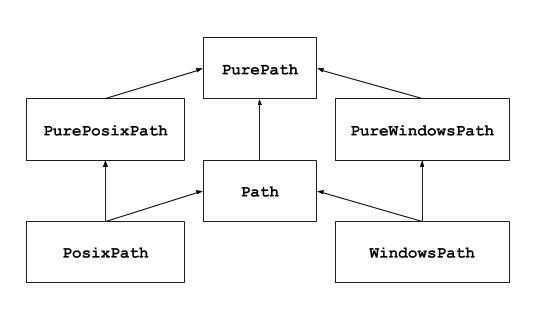
此模块提供表示文件系统路径的类,其语义适用于不同的操作系统。 路径类分为:
- 用于纯计算无 I/O 的 pure paths
- 继承 pure paths 但是有 I/O 操作的 concrete paths
基本使用
导入 Path
from pathlib import Path
p = Path('.')
列出所有子目录
[x for x in p.iterdir() if x.is_dir()]
列出所有 py 源码文件
list(p.glob('**/*.py'))
在目录树中移动
p = Path('/etc')
q = p / 'init.d' / 'reboot'
# .resolve() 方法会解析所有符号链接,返回文件绝对路径
# mac os 中的 /etc 实际上是一个符号链接,指向 /private/etc
q.resolve()
查询文件路径
q.exists() # 文件是否存在
q.is_dir() # 是否为目录
打开一个文件
q = Path('.') / 'file.py'
with q.open() as f:
    # 读取第一行内容
    f.readline()
Pure paths 纯路径
Pure path 对象提供路径处理操作,这些操作无需真的访问操作系统。 有三种方法来操作这些类,也被称为 flavours (风格):
class pathlib.PurePath(*pathsegemnts)
为一个通用的类,代表当前系统的路径风格>>> PurePath('setup.py') PurePosixPath('setup.py')pathsegments 的每个元素即可以是代表一个路径的字符串,也可以是实现了 os.PathLike 接口的对象,其中 fspath() 方法返回一个字符串,例如另一个路径对象:
>>> PurePath('foo', 'some/path', 'bar')
PurePosixPath('foo/some/path/bar')

>>> PurePath(Path('foo'), Path('bar'))
PurePosixPath('foo/bar')
当 pathsegments 为空的时候,默认为当前目录:
>>> PurePath()
PurePosixPath('.')
如果中间出现了绝对路径,则前面所有段都会被忽略
>>> PurePath('/etc', '/usr', 'lib')
PurePosixPath('/usr/lib')

>>> PurePath('c:/Windows', 'd:bar')
PureWindowsPath('d:bar')
在 Windows 上,当遇到带根符号的路径段时,驱动器将不会被重置
>>> PurePosixPath('c:Windows', '/Program Files')
PureWindowsPath('c:/Program Files')
假斜杠 spurious slashes 和单个点号会被消除,但双点号
..和双斜杠//不会>>> PurePath('foo//bar') PurePosixPath('foo/bar') >>> PurePath('//foo/bar') PurePosixPath('//foo/bar') >>> PurePath('foo/./bar') PurePosixPath('foo/bar') >>> PurePath('foo/../bar') PurePosixPath('foo/../bar')class pathlib.PurePosixPath(*pathsegments)PurePath的子类,代表非 Windows 风格的文件系统路径>>> PurePosixPath('/etc/hosts') PurePosixPath('/etc/hosts')class pathlib.PureWindowsPath(*pathsegments)
Windows 风格的文件系统路径>>> PureWindowsPath('c:/', 'Users', 'Ximénez') PureWindowsPath('c:/Users/Ximénez') >>> PureWindowsPath('//server/share/file') PureWindowsPath('//server/share/file')
General properties 通用属性
Paths 是不可变且可哈希的 hashable,且同种风格的 Path 是可对比和可排序的。这些属性遵循风格的大小写折叠语义:
# Unix 大小写敏感
>>> PurePosixPath('foo') == PurePosixPath('Foo')
False

# Windows 大小写不敏感
>>> PureWindowsPath('foo') == PurePosixPath('FOO')
True
>>> PureWindowsPath('FOO') in { PureWindowsPath('foo') }
True

>>> PureWindowsPath('C:') < PureWindowsPath('D:')
True
不同风格路径比较会得到不等的结果,且无法排序:
>>> PureWindowsPath('foo') == PurePosixPath('foo')
False

>>> PureWindowsPath('foo') < PurePosixPath('foo')
Traceback (most recent call last):
  File "<stdin>", line 1, in <module>
TypeError: '<' not supported between instances of 'PureWindowsPath' and 'PurePosixPath'
Operators 运算符
斜杠操作符可以创建子路径,如 os.path.join()。如果参数本身就是绝对路径,则该路径会替换原来路径;在 Windows 上,当参数为带根符号的相对路径,驱动器不会被重置。
>>> p = PurePath('/etc')
PurePosixPath('/etc')

>>> p / 'init.d' / 'apache2'
PurePosixPath('/etc/init.d/apache2')

>>> p / '/an_absolute_path'
PurePosixPath('/an_absolute_path')

>>> q = PurePath('bin')
>>> '/usr' / q
PurePosixPath('/usr/bin')

>>> PureWindowsPath('c:/Windows', '/Program Files')
PureWindowsPath('c:/Program Files')
os.PathLike 是一个协议接口,任何实现了这个接口的对象都可以被 Python 的文件系统相关函数识别为有效的路径。
import os
p = PurePath('/etc')
os.fspath(p) # '/etc'
路径的字符串表示形式,可以是系统路径形式,可以将其传递给任何文件路径作为字符串函数:
p = PurePath('/etc')
str(p) # '/etc'

p = PureWindowsPath('c:/Program Files')
str(p) # 'c:\\Program Files'
Accessing individual parts 访问各个部分
使用下面属性来访问不同部分:
PurePath.parts: 路径各部分组成的元组p = PurePath('/usr/bin/python3') p.parts # ('/', 'usr', 'bin', 'python3') p = PureWindowsPath('c:/Program Files/PSF') p.parts # ('c:\\', 'Program Files', 'PSF')
Methods and properties 方法和属性
Pure path 纯路径提供了下面的方法和属性:
PurePath.drive: 表示驱动器号或磁盘(如果存在)>>> PureWindowsPath('c:/Program Files/').drive 'c:' >>> PureWindowsPath('/Program Files').drive '' >>> PurePosixPath('/etc').drive ''UNC (Universal Naming Convention) 网络共享路径也被当作 drive:
>>> PureWindowsPath('//host/share/foo.txt').drive '\\\\host\\share'PurePath.root: 代表根目录的字符串>>> PureWindowsPath('c:/Program Files/').root '\\' >>> PureWindowsPath('c:Program Files').root '' >>> PurePosixPath('/etc').root '/'UNC 也有根目录:
>>> PureWindowsPath('//host/share').root
'\\'
如果路径以多余 2 个连续的 slash 斜线,PurePosixPath 会将其折叠:
>>> PurePosixPath('//etc').root '//' >>> PurePosixPath('///etc').root '/' >>> PurePosixPath('////etc').root '/'PurePath.anchor: 驱动器和根目录的连接>>> PureWindowsPath('c:/Program Files/').anchor 'c://' >>> PureWindowsPath('c:Program Fiels/').anchor 'c:' >>> PurePosixPath('/etc/').anchor '/' >>> PurePosixPath('//host/share').anchor '\\\\host\\share\\'PurePath.parents: 父路径的不可变序列>>> p = PureWindowsPath('c:/foo/bar/setup.py') >>> p.parents[0] PureWindowsPath('c:/foo/bar') >>> p.parents[1] PureWindowsPath('c:/foo') >>> P.parents[2] PureWindowsPath('c:/')PurePath.parent: path 的逻辑父路径>>> p = PurePosixPath('/a/b/c/d') >>> p.parent PurePosixPath('/a/b/c')由于这是单纯的 lexical 操作,因此会有以下的行为:
>>> p = PurePosixPath('foo/..') >>> p.parent PurePosixPath('foo')PurePath.name: 表示最终路径组件的字符串,不包括驱动器和根目录>>> PurePosixPath('my/library/setup.py').name 'setup.py'且 UNC 驱动器名称不被考虑在内
>>> PureWindowsPath('//some/share/setup.py').name 'setup.py' >>> PureWindowsPath('//some/share') ''PurePath.suffix: 最终组件的后缀>>> PurePosixPath('my/library/setup.py').suffix '.py' >>> PurePosixPath('my/library.tar.gz').suffix '.gz' >>> PurePosixPath('my/library').suffix ''PurePath.suffixes: 路径文件的扩展名列表>>> PurePosixPath('my/library.tar.gar').suffixes ['.tar', '.gar'] >>> PurePosixPath('my/library.tar.gz').suffixes ['.tar', '.gz'] >>> PurePosixPath('my/library').suffixes []PurePath.stem: 不含 suffix 后缀的最终组件>>> PurePosixPath('my/library.tar.gz').stem 'library.tar' >>> PurePosixPath('my/library.tar').stem 'library' >>> PurePosixPath('my/library').stem 'library'PurePath.as_posix(): 返回使用正斜杠/的路径>>> p = PureWindowsPath('c:\\windows') >>> str(p) 'c:\\windows' >>> p.as_posix() 'c:/windows'PurePath.as_uri(): 使用fileURL 显示文件, 如果不是绝对路线,会有 ValueError 报错>>> p = PurePosixPath('/etc/passwd') >>> p.as_uri() 'file:///etc/passwd' >>> p = PurePosixPath('c:/Windows') >>> p.as_uri() 'file:///c:/Windows'PurePath.is_absoulte(): 返回该路径是否为绝对路径,绝对路径有 root 根和 drive 驱动器(如果是这种风格)>>> PurePosixPath('/a/b').is_absoulte() True >>> PurePosixPath('a/b').is_absoulte() False >>> PureWindowsPath('c:/a/b').is_absoulte() True >>> PureWindowsPath('/a/b').is_absoulte() False >>> PureWindowsPath('c:').is_absoulte() False >>> PureWindowsPath('//some/share').is_absoulte() TruePurePath.is_relative_to(other): 返回此路径是否是相对于 other 的路径p = PurePath('/etc/passwd') p.is_relative_to('/etc') # True p.is_relative_to('/usr') # False该方法基于字符串;它不会访问文件系统,也不会对
..进行额外处理,以下代码等价:u = PurePath('/usr') u == p or u in p.parents # FalsePurePath.is_reserved(): 是否为 Windows 路径PureWindowsPath('nul').is_reserved() # True PurePosixPath('nul').is_reserved() # FalsePurePath.joinpath(*pathsegments): 依次将路径与给定的每个 pathsegments 组合到一起PurePosixPath('/etc').joinpath('passwd') # PurePosixPath('/etc/passwd') PurePosixPath('/etc').joinpath(PurePosixPath('passwd')) # PurePosixPath('/etc/passwd')PurePath.match(pattern, *, case_sensitive=None): 路径样式匹配,成功返回 True,否则返回 False
如果 pattern 是相对路径,则可以是相对或者绝对路径PurePath('a/b.py').match('*.py') # True PurePath('a/b/c.py').match('b/*.py') # True PurePath('a/b/c.py').match('a/*.py') # False如果 pattern 是绝对的,则路径必须局对,且完全匹配
PurePath('/a.py').match('/*.py') # True
PurePath('a/b.py').match('/*.py') # False
pattern 可以是字符串,也可以是另一个 path 对象, 这样实际上能加快多个文件的匹配速度
pattren = PurePath('*.py')
PurePath('a/b.py').match(pattern) # True
是否大小写敏感取决于平台规则
PurePosixPath('b.py').match('*.PY') # False PureWindowsPath('b.py').match('*.PY') # TruePurePath.with_name(name): 返回一个新的路径并修改 name,如果原本路径没有 name,则抛出 ValueError>>> p = PureWindowsPath('c:/Downloads/pathlib.tar.gz') >>> p.with_name('setup.py') PureWindowsPath('c:/Downloads/setup.py') >>> p = PureWindowsPath('c:/') >>> p.with_name('setup.py') Traceback (most recent call last): File "<stdin>", line 1, in <module> File "/home/antoine/cpython/default/Lib/pathlib.py", line 751, in with_name raise ValueError("%r has an empty name" % (self,)) ValueError: PureWindowsPath('c:/') has an empty namePurePath.with_stem(stem): 返回一个带有修改后 stem 的新路径,如果原路径没有名称,则抛出 ValueError>>> p = PureWindowsPath('c:/Downloads/draft.txt') >>> p.with_stem('final') PureWindowsPath('c:/Downloads/final.txt') >>> p = PureWindowsPath('c:/Downloads/pathlib.tar.gz') >>> p.with_stem('lib') PureWindowsPath('c:/Downloads/lib.gz') >>> p = PureWindowsPath('c:/') >>> p.with_stem('') Traceback (most recent call last): File "<stdin>", line 1, in <module> File "/home/antoine/cpython/default/Lib/pathlib.py", line 861, in with_stem return self.with_name(stem + self.suffix) File "/home/antoine/cpython/default/Lib/pathlib.py", line 851, in with_name raise ValueError("%r has an empty name" % (self,)) ValueError: PureWindowsPath('c:/') has an empty namePurePath.with_suffix(suffix): 返回一个新的路径并修改 suffix。如果原本的路径没有后缀,新的 suffix 则被追加以代替。如果 suffix 是空字符串,则原本的后缀被移除:>>> p = PureWindowsPath('c:/Downloads/pathlib.tar.gz') >>> p.with_suffix('.bz2') PureWindowsPath('c:/Downloads/pathlib.tar.bz2') >>> p = PureWindowsPath('README') >>> p.with_suffix('.txt') PureWindowsPath('README.txt') >>> p = PureWindowsPath('README.txt') >>> p.with_suffix('') PureWindowsPath('README')PurePath.with_segments(*pathsegments): 通过组合给定的路径段创建一个相同类型的新路径对象。每当创建派生路径时(例如通过 parent 和 relative_to() 操作),就会调用此方法。子类可以重写此方法以向派生路径传递信息,例如:from pathlib import PurePosixPath class MyPath(PurePosixPath): def __init__(self, *pathsegments, session_id): super().__init__(*pathsegments) self.session_id = session_id def with_segments(self, *pathsegments): return type(self)(*pathsegments, session_id=self.session_id) etc = MyPath('/etc', session_id=42) hosts = etc / 'hosts' print(hosts.session_id) # 42上面说法可能比较抽象,下面举例子说明
- Web 服务器的文件访问控制
from pathlib import PurePosixPath class SecurePath(PurePosixPath): def __init__(self, *pathsegments, user_role): super().__init__(*pathsegments) self.user_role = user_role # 用户权限:'admin', 'user', 'guest' def with_segments(self, *pathsegments): # 关键:创建新路径时保持用户权限 return type(self)(*pathsegments, user_role=self.user_role) def can_read(self): # 基于用户角色检查文件访问权限 if self.user_role == 'admin': return True elif self.user_role == 'user': return not self.name.startswith('secret_') else: # guest return self.name.endswith('.txt') # 使用示例 admin_path = SecurePath('/var/www', user_role='admin') secret_file = admin_path / 'secret_data.csv' # 自动保持 admin 权限 print(secret_file.can_read()) # True - 管理员可以访问 user_path = SecurePath('/var/www', user_role='user') user_secret = user_path / 'secret_data.csv' # 自动保持 user 权限 print(user_secret.can_read()) # False - 普通用户不能访问秘密文件- 云存储路径管理
class CloudPath(PurePosixPath):
    def __init__(self, *pathsegments, bucket_name, storage_class):
        super().__init__(*pathsegments)
        self.bucket_name = bucket_name      # 存储桶名称
        self.storage_class = storage_class  # 存储类型:'standard', 'archive'

    def with_segments(self, *pathsegments):
        # 创建新路径时保持存储配置
        return type(self)(*pathsegments,
                         bucket_name=self.bucket_name,
                         storage_class=self.storage_class)

    def get_cloud_url(self):
        return f"https://{self.bucket_name}.s3.amazonaws.com{self}"

# 使用示例
backup_root = CloudPath('/backups', bucket_name='my-company', storage_class='archive')

# 所有子路径自动继承相同的存储配置
daily_backup = backup_root / '2024' / '01' / 'database.dump'
print(daily_backup.bucket_name)    # 'my-company'
print(daily_backup.storage_class)  # 'archive'
print(daily_backup.get_cloud_url())
# https://my-company.s3.amazonaws.com/backups/2024/01/database.dump
没有
with_segments的对比:# 如果没有 with_segments: backup_root = CloudPath('/backups', bucket_name='my-company', storage_class='archive') daily_backup = backup_root / '2024' / '01' / 'database.dump' # daily_backup 会变成普通的 PurePosixPath,丢失所有自定义属性! print(hasattr(daily_backup, 'bucket_name')) # False 😞 print(hasattr(daily_backup, 'storage_class')) # False 😞
Concrete paths 具体路径
具体路径是存路径的子类,该类型额外提供了系统调用路径对象的方法,有三种方法实例化具体路径:
class pathlib.Path(*pathsegments):PurePath的一个子类,生成系统风格的具体类,会生成PosixPath或WindowsPath>>> Path('setup.py') PosixPath('setup.py')class pathlib.PosixPath(*pathsegments):Path和PurePosixPath的子类,这个类代表非 Windows 系统的文件路径>>> PosixPath('/etc/hosts') PosixPath('/etc/hosts')class pathlib.WindowsPath(*pathsegments):Path和PureWindowsPath的子类,这个类代表 Windows 系统的文件路径>>> WindowsPath('c:/', 'Users', 'Ximénez') WindowsPath('c:/Users/Ximénez')
只能在系统中实例化相同风格的 Path,否则错误
>>> import os
>>> os.name
'posix'
>>> Path('setup.py')
PosixPath('setup.py')
>>> PosixPath('setup.py')
PosixPath('setup.py')
>>> WindowsPath('setup.py')
Traceback (most recent call last):
File "<stdin>", line 1, in <module>
File "pathlib.py", line 798, in __new__
% (cls.__name__,))
NotImplementedError: cannot instantiate 'WindowsPath' on your system
Expanding and resolving paths 扩展和解析路径
classmethod Path.home(): 返回一个表示用户家目录的Path对象,如果无法解析出家目录,会产生一个 RuntimeError>>> Path.home() PosixPath('/home/antoine')Path.expanduser(): 使用与os.path.expanduser()相同的规则展开路径中的~或~user,返回一个新的Path对象。如果无法解析出家目录, 引发RuntimeError>>> p = PosixPath('~/films/Montry Python') >>> p.expanduser() PosixPath('/home/starslayerx/films/ Montry Python')classmethod Path.cwd(): 返回一个当前目录的Path,同 os.getcwd()>>> Path.cwd() PosixPath('/home/starslayerx/pathlib')Path.absolute(): 获取绝对路径,无需标准或解析符号链接,返回新的路径。>>> p = Path('tests') >>> p PosixPath('tests') >>> p.absolute() PosixPath('/home/starslayerx/pathlib/tests')Path.resolve(strict=False): 获取绝对路径,解析任何符号链接(唯一的方法)p = Path() >>> p PosixPath('.') >>> p.resolve() PosixPath('/home/starslayerx/pathlib')..这样的组成也会被消除>>> p = Path('docs/../setup.py') >>> p.resolve() PosixPath('/home/starslayerx/pathlib/setup.py')如果 path 不存在且 strict 为
True则会引起 FileNotFoundError。如果 strict 为False,则会尽可能解析,而不检查其是否存在。如果解析器路径中遇到无限循环,则引起 RuntimeError。Path.readlink(): 返回符号链接指向的路径(同 os.readlink())>>> p = Path('mylink') >>> p.symlink_to('setup.py') >>> p.readlink() PosixPath('setup.py')
Query flie type and status 查询文件类型和状态
Path.stat(*, follow_symlinks=True): 返回一个包含路径信息的 os.stat_result 对象,类似 os.stat()。此方法会追踪符号链接,要对 symbolic link 符号链接使用 stat 请添加参数
follow_symlinks=False,或者使用lstat()。>>> p = Path('setup.py') >>> p.stat().st_size # 字节大小 956 >>> p.stat().st_mtime # 最后修改的时间戳 1327883547.852554Path.lstat(): 就和Path.stat()一样,但是如果路径指向符号链接,则是返回符号链接而不是目标的信息。Path.exists(*, follow_symlinks=True): 如果 path 指向一个存在的文件或目录,就返回True。这条命令通常会追踪符号链接,如果检查一个符号链接是否存在,使用参数follow_symlinks=False。>>> Path('.').exists() True >>> Path('setup.py').exists() True >>> Path('/etc').exists() True >>> Path('nonexistentfile').exists() FalsePath.is_file(): 如果为普通文件,返回True。如果不是文件,或者不存在,或者是损坏的符号链接,都返回False。Path.is_dir(): 如果为目录,返回True,同上,其他情况返回False。Path.is_symlink(): 如果为 symbolic link 符号链接,则返回True。Path.is_junction(): 如果是一个 junction 交接点,返回True。(3.12 新增)
Junction(交接点)是 Windows 操作系统中的一种特殊文件夹,它像一个“快捷方式”或“指针”,可以指向本地磁盘上的另一个文件夹。可以把它想象成一个 “指向文件夹的快捷方式”,但它比普通的快捷方式(.lnk 文件)更底层、更强大。Path.is_mount(): 如果是一个挂载点,返回TruePath.is_socket(): 是否是一个 Unix 套接字(Unix 套接字是一种特殊的文件类型,用于同一台计算机上的进程间通信)Path.is_fifo(): 是否指向一个 FIFO 管道(管道提供了一个进程间通信的机制,允许不相关的进程通过文件系统进行数据交换)Path.is_block_device(): 判断是否为一个 block device 块设备(块设备是以固定大小的数据块为单位进行读写操作的存储设备)Path.is_char_device(): 判断是否是一个字符设备(字符设备是以字符流为单位进行顺序读写操作的设备)Path.samefile(other_path): 判断是否是指向同一个文件,语义类似 os.path.samefile() 和 os.path.samestat()。如果另一个文件不可达,引发 OSError。
Reading and writing file 读写文件
Path.open(mode='r', buffering=-1, encoding=None, errors=None, newline=None)
打开指向的文件,类时内置的 open() 函数。p = Path('setup.py') with p.open() as f: f.readline()Path.read_text(encoding=None, errors=None)
以字符串形式返回文件编码内容>>> p = Path('my_text_file') >>> p.write_text('Text file contents') 18 >>> p.read_text() 'Text file contents'Path.read_bytes()
返回指向文件的二进制内容>>> p = Path('my_binary_file') >>> p.write_bytes(b'Binary file contents') 20 >>> p.read_bytes() b'Binary file contents'Path.write_text(data, encoding=None, errors=None, newline=None)
字符串模式打开文件,向打开的文件写入文本,然后关闭>>> p = Path('my_text_file') >>> p.write_text('Text file contents') 18 >>> p.read_text() 'Text file contents'Path.write_bytes(data)
二进制模式打开文件,向其写入数据,然后关闭文件>>> p = Path('my_binary_file') >>> p.write_bytes(b'Binary file contents') 20 >>> p.read_bytes() b'Binary file contents'
Reading directories 读取目录
Path.iterdir()
当路径是目录的时候,返回目录中的每个 path 对象>>> p = Path('docs') >>> for child in p.iterdir(): child ... PosixPath('docs/conf.py') PosixPath('docs/_templates') PosixPath('docs/make.bat') PosixPath('docs/index.rst') PosixPath('docs/_build') PosixPath('docs/_static') PosixPath('docs/Makefile')子文件(夹)会以任意顺序返回,但不包含
.或..,如果在创建迭代器后删除或添加文件。 则会引发不确定行为,如果该 path 不是一个目录或者其他不可访问的情况,会引发 OSErrorPath.glob(pattern, *, case_seneitive=None)
根据给定的模式在目录下搜索>>> sorted(Path('.').glob('*.py')) [PosixPath('pathlib.py'), PosixPath('setup.py'), PosixPath('test_pathlib.py')] >>> sorted(Path('').glob('*/*.py')) [PosixPath('docs/conf.py')]匹配模式和 fnmatch 一样,额外的
**表示该目录并递归所有子目录,换句话说,它支持递归匹配:>>> sorted(Path('.').glob('**/*.py')) [PosixPath('build/lib/pathlib.py'), PosixPath('docs/conf.py'), PosixPath('pathlib.py'), PosixPath('setup.py'), PosixPath('test_pathlib.py')]该方法会在顶层目录上调用 Path.is_dir() 并传播任何 OSError
Path.rglob(pattern, *, case_seneitive=None)
递归匹配所有子目录,等于Path.glob()使用**/前缀匹配>>> sorted(Path().rglob('*.py')) [PosixPath('build/lib/pathlib.py'), PosixPath('docs/conf.py'), PosixPath('pathlib.py'), PosixPath('setup.py'), PosixPath('test_pathlib.py')]Path.walk(top_down=True, on_error=None, follow_symlinks=False)(3.12)
遍历目录树,类似os.walk(),该方法会递归遍历目录,在每一层目录返回一个三元组:(dirpath, dirnames, filenames)- dirpath: 当前正在遍历的目录名称 (
Path对象) - dirnames: 当前目录中子目录的名字
- filenames: 当前目录中的普通文件名
from pathlib import Path
for dirpath, dirnames, filenames in Path('my_project').walk:
    print(dirpath, dirnames, filenames)
当
top_down=True时,可以在循环中修改dirnames来控制递归for root, dirs, files in Path('src').walk(): if 'build' in dirs: dirs.remove('build')这样
walk()就不会深入build/,如果top_down=False则没有效果,因为子目录已经遍历完了典型使用场景:
- 统计目录大小
from pathlib import Path for root, dirs, files in Path('cpython/lib/concurrent').walk(on_error=print): total = sum((root / f).stat().st_size for f in files) print(root, "consumes", total, "bytes in", len(files), "files") if '__pycache__' in dirs: dirs.remove('__pycache__')- 递归删除目录 (类时 shutil.rmtree)
for root, dirs, files in Path('top').walk(top_down=False): for name in files: (root / name).unlink() for name in dirs: (root / name).rmdir()- dirpath: 当前正在遍历的目录名称 (
Creating files and directories 创建文件和目录
Path.touch(mode=0o666, exist_ok=True)
根据 Path 路径创建文件,mode为 8 进制表示的文件权限,exist_ok=True时如果文件已存在会更新文件修改时间,否则返回 FileExistsErrorPath.mkdir(mode=0o777, parents=False, exist_ok=False)
根据给定的路径创建目录, 如果目录已存在会引起 FileExistsError
如果parent=True则可以递归创建目录,否则当上级目录不存在的时候会报错 FileNotFoundErrorPath.symlink_to(target, target_is_directory=False)
根据Path创建符号链接>>> p = Path('mylink') >>> p.symlink_to('setup.py') >>> p.resolve() PosixPath('/home/antoine/pathlib/setup.py') >>> p.stat().st_size 956 >>> p.lstat().st_size 8Path.hardlink_to(target)
根据 path 路径创建硬链接。硬链接是创建了一个新的文件名,但是指向同一块文件内容(inode),类时 python 的赋值,赋值了一份引用,删除硬链接并不会删除文件内容;而软链接则是保存了目标路径的字符串,类似快捷方式。
Renaming and deleting 重命名和删除
Path.rename(target)
重命名 Path 路径的文件为 target>>> p = Path('foo') >>> p.open('w').write('some text') 9 >>> target = Path('bar') >>> p.rename(target) PosixPath('bar') >>> target.open().read() 'some text'Path.replace(target)
将目录或文件重命名为 target,并返回指向命名后的 Path 对象。如果命名后的文件或目录已经存在,则会直接替换掉该对象。Path.unlink(missing_ok=False)
删除文件或符号链接,如果路径指向目录,使用Path.rmdir()方法。Path.rmdir()
删除目录,目录必须为空。
Permissions and ownership 权限和所有权
Path.owner()
返回拥有该文件的用户名,如果该用户的 UID 系统中不存在,会引发 KeyErrorPath.group()
返回拥有该文件的用户组,同样如果 GID 不存在,会引起 KeyErrorPath.chmod()
修改模式权限,类似 os.chmod()
这种方法通常遵循符号链接,一些 Unix 发行版支持更改符号链接本身的权限;在这些平台上,可以添加参数follow_symlinks=False,或者使用 lchmod()。>>> p = Path('setup.py') >>> p.stat().st_mode 33277 >>> p.chmod(0o444) >>> p.stat().st_mode 33060Path.lchmod(mode)
类似 Path.chomd 但是如果路径是一个符号链接,则修改的是符号链接的权限,而不是指向文件的权限。